


Lynx T6-2 LED Warning Light
Professional Installation Manual
Important Notice
This manual applies only to the Lynx T6-2 LED Warning Light. Installation and control information below is based on the supplied Lynx T6-2 wiring schematic and product image.
This warning device is intended to improve vehicle visibility. The use of warning lighting does not guarantee that other motorists or pedestrians will see or react to the signal. The operator remains responsible for safe vehicle operation at all times.
Improper installation, incorrect wiring, or unsecured mounting may result in reduced performance, product damage, vehicle damage, or personal injury.
Warnings and Notices for Users and Installers
- Read this manual fully before installation and use.
- Inspect and bench-test the unit before final installation.
- Do not operate the unit with exposed or unprotected wiring.
- Route all wiring away from sharp edges, heat sources, and moving components.
- Do not install wiring or controls in airbag or SRS deployment zones.
- Do not assume warning lighting grants right of way.
Safety Warnings
- Do NOT look directly into illuminated LEDs at close range.
- Disconnect vehicle power before making or changing wiring connections.
- Use a 5 A fuse for one Lynx T6-2. The optional cigarette-lighter plug includes a fuse; a hardwired installation requires a separately supplied 5 A fuse and suitable fuse holder.
- Do not open or modify the light housing.
- Secure all wiring with loom, grommets, and cable ties where appropriate.
- Confirm that the selected light color and operating mode comply with applicable laws before use.
Notice of Liability
Manufacturer assumes no liability for improper installation, incorrect wiring, misuse, or operation that does not comply with applicable law.
The user and installer are responsible for proper mounting, correct wiring, safe operation, and legal compliance.
Legal Compliance
Before operating this light, confirm that the selected color and flash pattern comply with your local and state laws. Visit the State Statutes Knowledge Base for complete details.
Maintenance
- Clean the lens with water and a soft cloth only.
- Do not use pressure washers, harsh solvents, or abrasive cleaners.
- Inspect wiring and mounting security regularly.
- Test all operating functions before each use where practical.
Product Overview

| Item | Specification |
|---|---|
| Model | Lynx T6-2 |
| Product Type | Compact LED warning light |
| Dimensions | 9.5" x 2" x 1.5" |
| Weight | 1.9 lbs |
| LED Count | 12 LEDs |
| LED Rating | 3-Watt LEDs |
| Lens Type | TIR |
| Flash Patterns | 36 |
| Memory | Dual Memory with 2 saved patterns |
| Max Amp Draw | 0.5 A flashing; 2.5 A steady-on at 12V |
| IP Rating | IP67 for light heads and housing; optional circuit-board waterproofing brings board to IP67 |
| Power Input | 12V DC nominal; 12–18V only |
| Power Connection | Hardwire standard; optional fused cigarette-lighter plug sold separately |
| Control Leads | Mode, Memory 1, Memory 2, SYNC |
| Ground | GND lead |
| Synchronization | SYNC lead for compatible multi-unit operation |
Key Features
- Compact dual-module LED warning-light design
- Dedicated MODE lead; momentary active-high +12V trigger
- Two memory-control leads; selected pattern saves automatically
- Synchronization control lead
- 12V power input with dedicated ground
Included / Connection Components
- Lynx T6-2 LED Warning Light
- Attached wiring harness
- Optional cigarette-lighter plug / switch assembly (sold separately)
Pre-Installation and Bench Testing
- Inspect the housing, lenses, cable, and harness for shipping or handling damage.
- Confirm the harness connector is fully seated before applying power.
- Connect GND and +12V to a suitable protected 12–18V DC source. Use a 5 A fuse for one unit. The fuse is included with the optional cigarette-lighter plug, but not with the hardwire unit.
- Verify the unit powers on using the hardwired connection or optional cigarette-lighter plug, depending on the selected setup.
- Verify the Mode, Memory 1, Memory 2, and SYNC functions with the intended control setup before final installation. The selected flash pattern saves automatically; no separate save step is required.
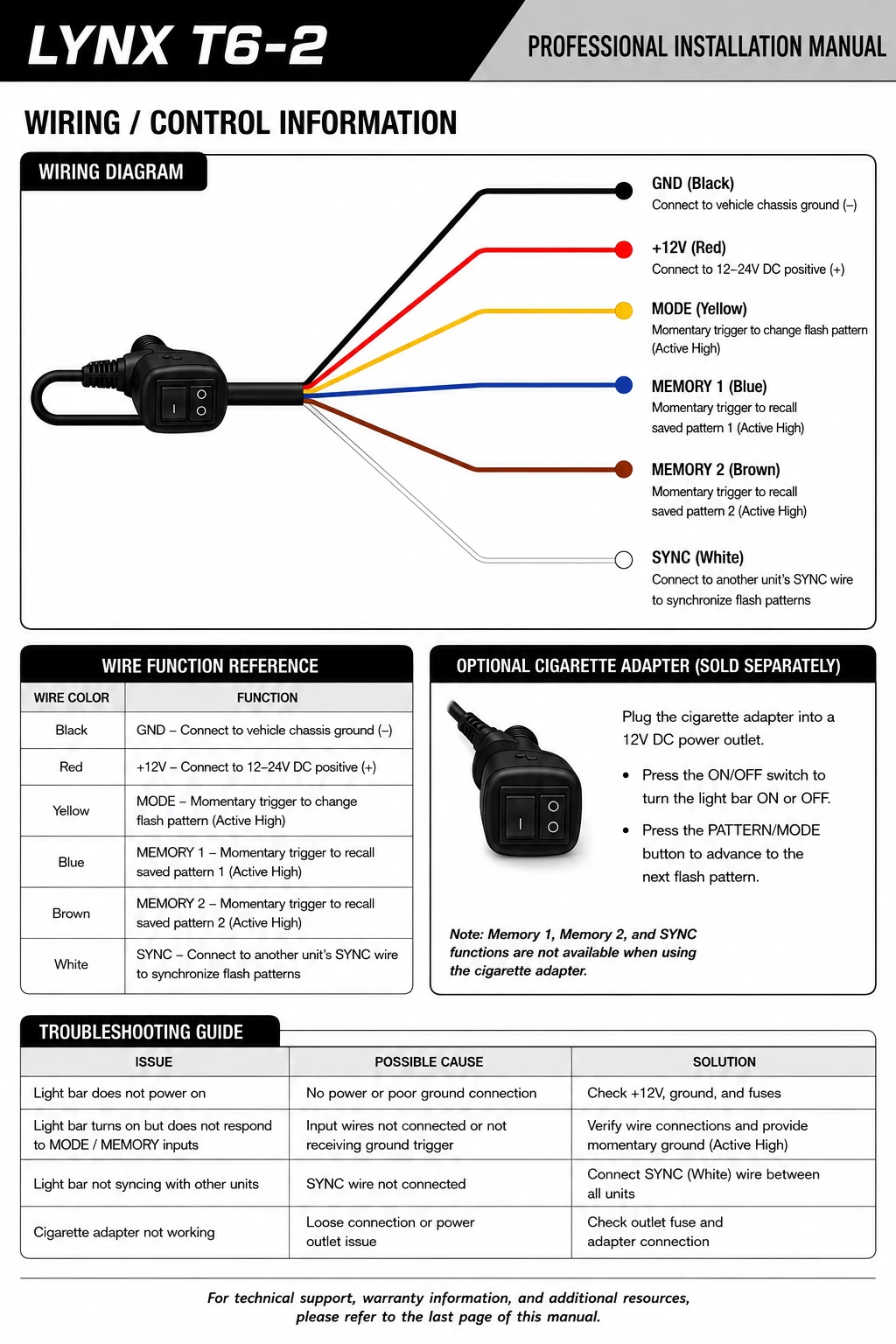
Wiring / Control Information
Installation Guidelines
- Select a mounting location that provides clear outward visibility and does not obstruct vehicle operation.
- Mount only to a structurally sound surface using hardware appropriate for the vehicle and application.
- Inspect both sides of the mounting surface before drilling.
- Use grommets at all wire pass-through holes.
- Protect exposed wiring with loom and secure it with cable ties.
- Confirm the light is secure and wiring is protected before placing the vehicle in service.
Operation
- Power the unit through a hardwired 12–18V DC connection or the optional cigarette-lighter plug. The optional plug includes a fuse; the hardwired unit does not.
- Apply a momentary active-high +12V trigger to the yellow MODE lead to advance through the flash patterns.
- Apply a momentary active-high +12V trigger to the blue MEMORY 1 lead or brown MEMORY 2 lead to recall the corresponding saved pattern. The selected pattern saves automatically.
- Use SYNC only when connecting compatible Lynx units for synchronized operation.
Memory Functions
The harness provides two memory-control leads: blue MEMORY 1 and brown MEMORY 2. Apply a momentary active-high +12V trigger to the appropriate lead to recall its saved pattern. The selected flash pattern saves automatically; no separate save step is required.
The MODE, MEMORY 1, and MEMORY 2 leads use momentary active-high +12V triggers. Do not connect these control leads directly to ground.
Synchronization
The white SYNC lead allows the Lynx T6-2 to synchronize with compatible current Lynx T6 lights. When connecting multiple units, route the synchronization wire separately from primary power wiring where practical and secure all connections against vibration and moisture.
Do not connect the SYNC lead to vehicle power or ground unless a compatible controller or model-specific diagram specifically calls for that connection.
Flash Pattern Information
The Lynx T6-2 has 36 selectable flash patterns. Apply a momentary active-high +12V trigger to the yellow MODE lead to advance to the next pattern. The selected pattern saves automatically.
Control Capabilities
- Mode selection through the dedicated Mode control lead
- Two memory-control inputs
- Multi-unit synchronization through the SYNC lead
Final Installation Check
- Confirm the light housing is securely mounted.
- Confirm GND and +12V connections are secure and protected.
- Confirm no wiring is pinched, exposed, or routed near heat or moving components.
- Verify Mode and memory-control functions.
- If multiple compatible units are synchronized, verify all units operate together correctly.
- Confirm legal compliance before placing the vehicle in service.
Warranty & Support
For warranty information and product-operation questions, email Extreme Tactical Dynamics customer service. The phone number below is for ordering, accessory, and fleet questions.
Email: customerservice@extremetacticaldynamics.com
Ordering and accessory questions: 1-888-893-3308